
















Beam for system integrators.
Client asset, contract and service management for system integrators.
- Your warehouseYour own equipment and spares, on your own record.
- Your officeOne master account above every client.
- Client: house of worshipSanctuary audio and video, with its warranties.
- Client: broadcast studioCameras and lighting, in a client-facing workspace.
- Client: control roomRouters and racks, firmware tracked by device.
- Client: corporate campusMeeting rooms and displays, in an internal workspace.
- Client: hotelBallroom and meeting room AV, with its support SLA.
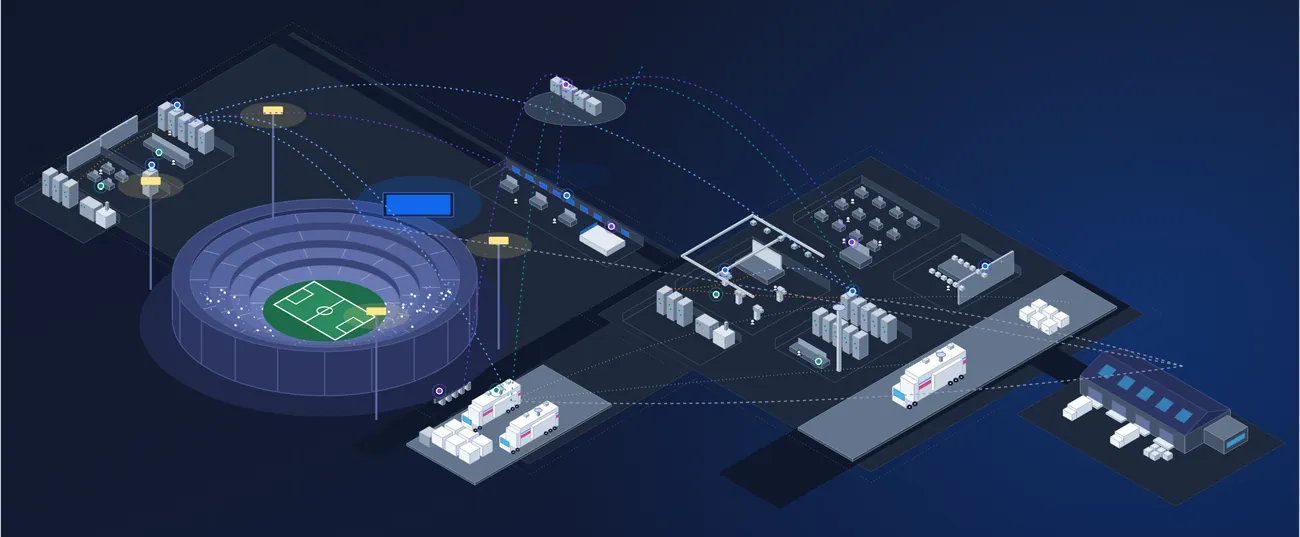
- Client: stadiumScreens and scoreboards, with client tickets in your queue.
Integrators and resellers who design, install and support systems for many clients run them all from one master account: a workspace for every client, with every renewal and ticket in view long after the install.
Every install ends at handover. The relationship should not.
- 01
The record is lost at handover.
Serial numbers, as-builts and warranty terms leave site in a handover pack. The next time your team needs them, they are in the client's files, not yours.
- 02
Renewals slip between clients.
Support, warranty and license dates sit in a different place for every client, so a renewal is missed and the client finds out first.
- 03
No view after the install.
Once the crew leaves site, you cannot see what is failing, out of warranty or due an update until the client calls.
Beam keeps every client on one master account: what you sold and installed, the contracts behind it and every ticket since, from the first purchase order to the next renewal.
Five jobs across every client. One account above them all.
The core workflows of an integration business, what each one looks like today, and the Beam product that runs it. Open any of them to see how it works.
01Deliver the projectProjects & ProcurementThe as-built is built as you go.
Equipment lists in spreadsheets, orders in email, and the as-built written up after the crew has left.
The project carries the equipment list, the quotes and the orders. Every item lands on the record as it arrives, with its vendor, cost and warranty.
02Hand over a live client recordIntegration IntelligenceThe handover starts the relationship.
A handover pack and a spreadsheet, out of date by the first service call.
What you installed moves into the client's own workspace, matched to manufacturer data. Keep it internal, or open it to the client with their own users and sign-in.
03Support every client from one master accountTicketing, Workflows & MaintenanceEvery client ticket in one queue.
Clients call, email and text. Technicians arrive without the record.
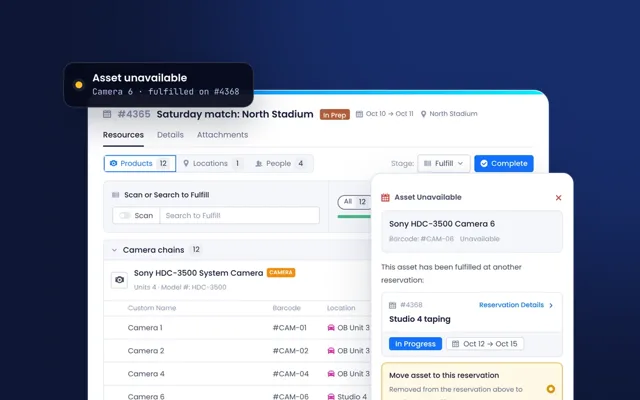
Clients raise tickets from their workspace against the exact asset, and they land in your queue. Technicians arrive with the full record, and service visits are planned against it.
04Renew service, warranties and licenses across clientsContract IntelligenceNo renewal missed, at any client.
Renewal dates kept client by client, found when the contract has already lapsed.
SLAs, warranties and licenses for every client sit in one list, tied to the equipment they cover. Alerts tell you what is expiring, and where.
05Grow recurring revenue across clientsIntegration IntelligenceThe next refresh, found before the client asks.
Refresh and upgrade work found when something fails.
Reports across every client show what is out of warranty, at end of life or due an update, and upsell opportunities surface with the client and assets behind them.
All five share one record of clients, assets, licenses, contracts, tickets, people and locations, kept current by Built-in Product Data and connected to your other systems through Integrations, API & MCP.
Asked every week. Answered from one record.
“Which clients renew this quarter?”
Every client's SLAs, warranties and licenses sit in one list, with alerts for what is expiring and where.
“What is open across every client?”
Client tickets from every workspace land in your queue, each one tied to the asset it is about.
“How is our installed base doing?”
Reports from the master account show what is out of warranty, at end of life or due an update, client by client.
“What did we install, and where?”
Every asset you sold sits in the client's workspace, matched to the manufacturer's product, with its manuals and specs.
Bring your own tools. Beam fits around them.
Connect the ERP, service desk, identity provider and AI assistants you already run. Each keeps its job, and the data meets on one record.
- Sync with your ERP and finance systems
- Tickets to and from your service desk
- Single sign-on through your identity provider
- AI assistants connected through MCP
- Open API and webhooks for your own apps
- Permissions and audit trail on every connection
Ready for your whole business, and every client in it.
Security, access and integration come as standard on every plan.
- Unlimited usersNo per-seat pricing, so every engineer and crew member can work in it.
- SSO and MFAOn every plan.
- Custom roles and permissionsEach group sees the records, fields and actions it should.
- Activity history and audit trailEvery change, attributed.
- Open API, webhooks and MCPYour ERP, service desk and AI tools work from the same record.
- Mobile app and scanningiOS and Android, barcode and QR, on the truck and in the rack room.
- Verified product dataFrom more than 11,000 manufacturers, kept current.
- Every future updateNo version lockout.
Your first client is live in weeks, not months.
Our team brings your data across with you, from spreadsheets, legacy asset and maintenance tools, ERP exports and invoices, using secure, AI-assisted migration.
- 01In daysMigrate
Spreadsheets and legacy tools come across with secure, AI-assisted migration, matched to the manufacturer's product as they land.
- 02AlongsideShape it to how you run
Views, fields and permissions set up for each team, and the systems you already use connected.
- 03In weeksYour first client goes live
Our team imports your data with you, so the first client workspace runs on Beam within weeks.
- 04ThenAdd every client
Each client gets its own workspace on the same master account, kept internal or opened to them, one client at a time.
For your team, your clients and your business.
Integrators run Beam inside their own business, give each client a workspace of its own, and build it into the service they sell.
See it with your own equipment.
Send us one client's equipment list and we will set it up as a sample client workspace in a live demo.