
















All features
Every capability in Beam, in one list, grouped by module. Search for what you need, or browse by module.
Asset Intelligence
The system of record for every asset, device, license or service.
Asset management
Records, lifecycle, status and reporting.
- Track any asset type
- Dynamic table view
- Lifecycle tracking
- Track asset availability
- Track asset location
- Asset groups
- Tags and kits
- Data and status management
- Custom fields and statuses
- Advanced and saved filters
- Configuration management
- Track warranty status
- Assign assets to users
- Mass edit data
- Quick actions for data updates
- Quick actions for creating entity relationships
- Status change notifications
- Detailed activity history of related events
- Link photos, documents and videos
- Decommission workflow
- Barcode scanning support
- Check-in and check-out status
- End-of-life alerts
- Warranty alerts
- Firmware and software updates
- Condition and performance monitoring
- Custom reporting
- Export to PDF or CSV
Locations
Where assets are, down to the rack.
- Manage internal and external locations
- Assign locations to assets
- Relate to tickets, reservations and maintenance records
- Location hierarchy up to 7 levels
- Track placement from building to room to rack
- Filter all modules by related locations
- Add addresses and notes
Files and documents
Manuals, warranties and asset documentation.
- Store any file type (PDF, image, spreadsheet, CAD and more)
- Folder-based organization
- Quick search and filtering
- Associate files to entities
- Pre-populated product manuals, datasheets and setup guides
- Ongoing monitoring and refresh of documents
- Product-linked documentation by model
- Global assignment to all assets
- Encrypted storage and controlled access
Password and credential vault
Device logins, encrypted and tied to the asset.
- Securely store usernames and passwords
- Encrypted credential storage
- Relate credentials to one or multiple assets
- Device-level password assignment
- Product-level password assignment
- Restricted access by user authorization
- Controlled credential sharing without exposure
- Configuration support for setup and maintenance
Configuration and custom fields
Fields, statuses and views of your own.
- Create custom fields, statuses and categories
- Custom asset to maintenance statuses
- Custom asset to reservation statuses
- Set unique fields
- Set default custom field values
- Date, text and description fields
- Number and currency fields
- Dropdown and checkbox fields
- Barcode fields
- Email and hyperlink fields
- Signature fields
- Advanced entity configuration
- Set default field display settings for users
- Custom views and saved filters (table, kanban, calendar, timeline)
- Custom PDF generator
Activity history and audit
Every change, with who and when.
- Comprehensive change tracking
- Timestamped logs
- User attribution
- Entity-specific display
- Global activity overview
- Change visibility
- Relationship creation logs
- Team mentions and notifications
- Real-time updates
- Multi-entity context
- Advanced filter and search
- Tamper-proof records
Tags and kits
Classify records and group them for reuse.
- Unlimited tags
- Create tag categories
- Advanced filtering based on tags
- Group assets by tags to create kits
Mobile app
The field counterpart to Beam on the web.
- Native iOS and Android apps
- Full-featured, not a stripped-down view
- Barcode and QR scanning in the field
- Mobile UI support across modules
- Check stock, update quantities and usage on mobile
- Check assets in and out from the field
- Create and manage service tickets
Contract Intelligence
Warranties, support agreements, licenses and subscriptions, with renewals.
License and contract management
Tracking, renewals, spend and reporting.
- License and contract tracking
- Renewal management and entitlements
- Spend visibility and vendor alignment
- Contract renewal alerts
- Vendor commitment tracking
- Connects with asset records
- Store documents and attachments
- Manage multiple terms and payments
- Detailed dashboards and reporting
- Standalone or connected deployment
Companies
The vendors and clients behind each agreement.
- Organize company records
- Asset and license relationships
- Associate contacts and locations
- Historical spend reports
- Asset lifecycle and license renewal tracking
- Full activity history and change log
- Add documentation and attachments
- Custom fields and views
Analytics and dashboards
A configurable picture of renewals and spend.
- Custom dashboards
- Visualize and organize data
- Graphs, charts and lists
- Manufacturer-specific reports
- Configurable dashboard views
Files and documents
Agreements, quotes and warranties, stored with the record.
- Store any file type (PDF, image, spreadsheet, CAD and more)
- Folder-based organization
- Quick search and filtering
- Associate files to entities
- Encrypted storage and controlled access
Integration Intelligence
A master account with a workspace for every client.
Integrator account and workspaces
The master account, client workspaces and portal.
- SI master account and integration admin
- Portfolio visibility across deployments
- Client asset and license tracking
- Internal or client-facing workspaces
- Per-workspace module activation
- Cross-deployment reporting
- Sold asset visibility
- Client self-service ticket submission
- Client-facing document manager
- Revenue and renewal management (SLA, warranty, license alerts)
- Upsell opportunity surfacing
- Post-deployment white-glove support
Users, roles and permissions
Who can see and do what, in each workspace.
- Controlled access based on attributes (ABAC)
- Role-based access control (RBAC)
- User roles
- User groups
- Single sign-on (SSO)
- Multi-factor authentication (MFA)
- Unlimited view-only users
- User directory
- Permission management
- Access revocation
Data import and migration
Getting each client's equipment in.
- Spreadsheet import via .csv or .xls
- Invoice and PO scanning with OCR
- Quick-add assets from preloaded catalog
- Auto-matched and enhanced with manufacturer data
- Preloaded manuals and specs
- Import full historical data (assets, tickets, reservations, purchases and more)
- Create relationships between imported records
- Track historical imports
- Track data review process
- API-based data import
Scheduling & Reservations
Plan, fulfill, check out and check in equipment, people and spaces.
Reservations
Booking what each job needs.
- Reservations for assets, kits, labor and locations
- Products, bundles and quantities
- Asset groups booked as one
- Substitute products when a unit is out
- Custom groups
- Clone reservations
- Stages: plan, fulfill, check out, check in
- Custom check statuses
- External communication
Views and scheduling
Seeing every booking.
- Timeline view
- Event calendar view with day panel
- Group by location, people, company or tag
- Filter resources by company category
- Saved and shared views
- Time zone per view
Availability and conflicts
Keeping bookings honest.
- Asset schedule on every asset
- Availability by unit
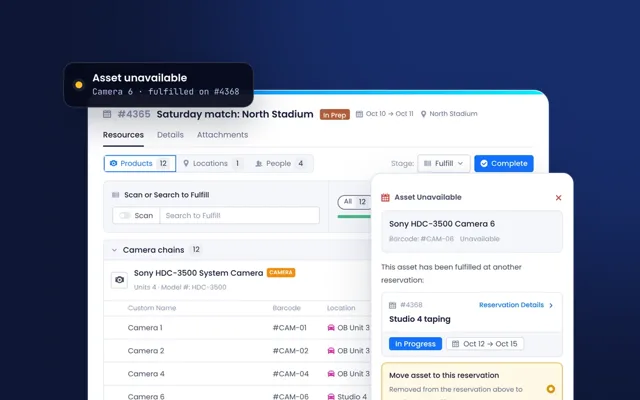
- Double booking alerts
- Checked out on another reservation
- Past due alerts
- Returning soon
Check-out and check-in
Out to the show and back.
- Barcode scanning
- Beam Lens mobile scanning app
- Scan to fulfill
- Electronic signature
- Report issues at check-in
People and crews
Booking the team.
- People on reservations
- Skill-based matching Coming soon
- Crew confirmation Coming soon
- Labor compliance rules Coming soon
Ticketing, Workflows & Maintenance
Service tickets, workflows and planned maintenance.
Service ticketing
Requests, repairs and incidents.
- Multiple ticket types and workflows
- Custom fields and statuses
- Shared inbox
- Kanban board view
- Primary and secondary asset linking
- Spare parts tracking
- Repair cost tracking
- External communication within tickets
- Attachments and comments with mentions
Ticket channels
Where requests come from.
- In-app ticket creation
- Public form for external users
- Email to ticket
- Client portal support requests
- Create and relate tickets from asset views
Maintenance
The work that keeps things running.
- Recurring maintenance tasks on assets and locations
- Calendar view
- User assignment
- Completion tracking
- Maintenance status per asset
- Attached checklists
- Repair tickets created for assets needing more service
Workflows and notifications
Moving work to the right person.
- Custom alerts and alert rules
- Status change notifications
- Notifications by user group
- Mention alerts
- Maintenance due alerts
- Ticket assignment notifications
Reports and records
Proof of the work.
- Custom PDF reports for tickets and maintenance
- Drag and drop template builder
- Activity history with full audit trail
- Dashboards for service metrics
In the field
Away from the desk.
- Mobile access to tickets and maintenance
- Beam Lens barcode scanning
- On-site ticket creation
Projects & Procurement
Purchase requests, approvals and projects, from quote to installed asset.
Purchases
From request to approved order.
- Purchase requests
- Organize requests by category
- Line items with vendors and quantities
- Approval workflows
- Assign requests to users
- Automatic cost totals
- Link purchases to service tickets and maintenance records
Receiving
From order to asset.
- Invoice and PO scanning with OCR
- Asset data extracted from invoices and packing slips
- Assets created on receipt
- Matched to verified manufacturer products
Resource Management
Your team and freelance crew, booked alongside the equipment they work with.
People and crews
Booking the team alongside the equipment.
- People on reservations
- Skill-based matching Coming soon
- Crew confirmation Coming soon
- Labor compliance rules Coming soon
- Crew assignments on reservations
Consumable & Parts Management
Spares and expendables, with stock levels, restock alerts and usage on the work.
Stock
Spares, expendables and bulk items.
- Inventory levels for spare parts, expendables and bulk items
- Minimum and maximum stock levels
- Restock quantities
- Stock location tracking
- Low stock alerts
- Restock notifications
Usage
Where stock goes.
- Usage tracking on tickets
- Usage tracking on maintenance
- Usage tracking on reservations
- Check stock and update quantities on mobile
Built-in Product Data
Verified manufacturer data on every record, with your own catalog on top.
Product and manufacturer data
What Beam Insights adds to a record.
- Auto-populated product and manufacturer data
- Dynamic matching algorithm
- Double human verification
- Validated model numbers
- Detailed product specifications
- Product manuals
- Firmware and software update tracking
- End-of-life announcements
- Life cycle status
- Standard warranty length
- Product name, description and category
- Product photos
- Product webpage links
- Service contacts and support info
- 11,000+ manufacturers covered
- Millions of products
- Refreshed 24/7
Catalog and bundles
Your own pricing, accessories and substitutes on top of the manufacturer data.
- Purchase cost
- Rental rates by day and week
- Sale price
- Required and optional accessories
- Product substitutions
- Substitute on a reservation with availability
- Product bundles with quantities
- Bundles added to reservations in one step
- Bundles for customer solutions
Adding equipment
Ways to bring assets in, matched as they arrive.
- Spreadsheet import via .csv or .xls
- Invoice and PO scanning with OCR
- Quick-add assets from preloaded catalog
- Auto-matched and enhanced with manufacturer data
- Preloaded manuals and specs
- Track data review process
Product documents
Manuals and datasheets from the manufacturer.
- Pre-populated product manuals, datasheets and setup guides
- Ongoing monitoring and refresh of documents
- Product-linked documentation by model
- Global assignment to all assets
Alerts on the asset record
What the data triggers in Asset Intelligence.
- End-of-life alerts
- Warranty alerts
- Firmware and software updates
- Track warranty status
Reporting by product and manufacturer
The estate, seen through its product data.
- Asset breakdown by product and manufacturer
- Reliability and failure-rate analysis
- Resolution time by product or manufacturer
- Manufacturer-specific reports
Integrations, API & MCP
ERP, CRM, service and purchasing systems, the API and MCP.
Connectors
The systems you already run, connected to the record.
- ERP and finance systems
- Purchase orders, invoices and cost centers
- Service desk and ticketing
- CRM companies and contacts
- Monitoring and alerting
- Spreadsheet import and export
- Reporting and BI exports
API and webhooks
For your own apps, scripts and data pipelines.
- Open REST API
- Assets, contracts, tickets, reservations and companies
- Webhooks when records change
- Keys issued per integration
- Developer documentation
MCP and AI
Your AI assistant, working from the record.
- MCP server for compatible AI assistants
- Questions answered from the live record
- Actions such as opening tickets and updating records
- Limited to the user's own access
Security and control
What each connection can see and change.
- Single sign-on through your identity provider
- Permissions per connection
- Audit trail on every change
- Controlled user access
Data migration
Bringing your history across.
- Secure, AI-assisted migration
- Spreadsheet import via .csv or .xls
- Legacy data import
- Matched to verified manufacturer products
Companies
Every vendor, partner and client on one page.
Company records
One page per company.
- Company categories: client, vendor, service provider, system integrator and your own
- Logo, details and custom fields
- Locations with addresses
- Contacts with roles, phone and email
- Link fields to other systems
Linked work
Everything you do together.
- Linked assets
- Schedule and reservations
- Tickets by ticket type
- Activity history
- Attachments
- Contracts
Spend and reporting
The numbers behind each relationship.
- Asset spend by company
- Counts of assets, contacts, reservations and tickets
- Saved views, filters and columns
- Export to CSV or PDF
Built into every module
Filters, saved views, relationships, quick actions and permissions, the same in every module.
Lists and views
How every list can be shaped.
- Filter any list by any field
- Any default or custom field as a column
- Resize and reorder columns
- Saved views for yourself, a team or everyone
- Table, kanban, calendar and timeline views
- Group and sort by any field
Records and relationships
What every record keeps.
- Relationships between any records
- Activity history on every record
- Comments and mentions
- Files on any record
- Custom fields and statuses, more than 15 field types
- Tags and tag categories
Actions and reporting
Getting work done, at any scale.
- Quick actions from the table
- Bulk edit
- Alerts and alert rules
- Notifications by user group
- Import from spreadsheets
- Export to CSV or PDF
- Clone records
- Custom PDF generator
- Custom dashboards and reports
Access and security
Who sees and does what.
- Role-based access control (RBAC)
- Attribute-based access control (ABAC)
- User groups and roles
- Single sign-on (SSO) with Okta and other providers
- Multi-factor authentication (MFA)
- Unlimited view-only users
- Audit trail on every change
- Automatic data backups
Anywhere access
On site, for clients and for your own tools.
- Native iOS and Android apps
- Barcode and QR scanning with Beam Lens
- Client portal
- Voice and chat assistant for data entry
- Open API
- MCP for AI assistants
Try a shorter word, or ask us about it in a demo.
Need something that is not on the list?
Tell us how you work. We will show you how Beam handles it, or where it is on the roadmap.