

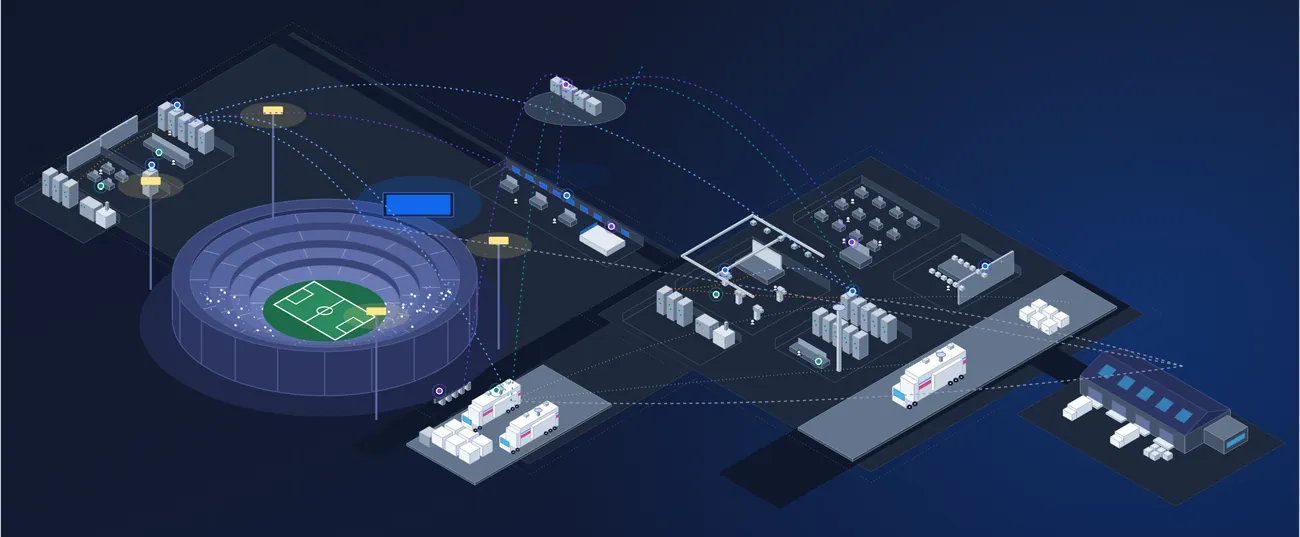














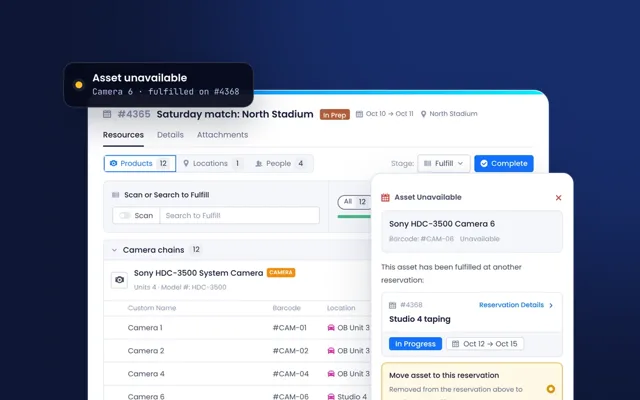

Every asset you own, maintain, support or rent, managed on one record.
Asset Intelligence is the core of Beam. Each device, license and service is a structured record that carries its configuration, location, coverage, status and full history, from acquisition to decommissioning.
Device · Serial # 4500213
Online
Checked Out
OB Unit 3
On the record
Product Lifecyclefrom the manufacturerSupported
Product Warrantylinked contractActive
Software Versionup to date3.20
License · 22 seats
Post, Studio 4
19 of 22
Mar 30, 2027
On the record
Contract statusannual termActive
Renewal statusApproved
Current Term Amount$31,680.00
Service · 2 channels
Channels 1 and 2
Online
Jun 29, 2027
On the record
Contract statusservice agreementActive
Renewal statusApproved
ProviderVCVendor C
The system of record for the whole asset lifecycle.
Records work for any asset type and sit in a table you can filter, sort and save as reusable views. Each one tracks configuration and changes, availability, location, warranty, condition and every event that has touched it.
Every other Beam product works from the same record, so a ticket, a reservation, a maintenance task and a purchase all reference the same equipment and share one history.
Any asset type
Devices, licenses and services, serialized or not, on the same kind of record.
The full lifecycle
From acquisition to decommissioning, with warranty and end-of-life alerts on the way.
Filled in for you
Specifications, manuals, warranty terms and lifecycle status come from the manufacturer.
Web and mobile
The same records at a desk or in the field, with barcode and QR scanning.
Every asset type, one structured record
Track anything you run as a record with its own fields, statuses and relationships. Work across thousands of them in a table you can filter, edit in bulk and save as views for each team.
- Track any asset type
- Custom fields and statuses, 17 field types
- Advanced and saved filters
- Mass edit and quick actions
- Table, kanban, calendar and timeline views
- Custom reporting, export to PDF or CSV
Product Name
Type
Product Warranty
Product Lifecycle
Location
HDC-3500 camera
Device
Active
Supported
OB Unit 3
Video router
Device
Expiring soon
Supported
OB Unit 3
Edit licenses
License
Empty
Supported
Studio 4
Audio console
Device
Expired
End of Life
Studio 4
Cloud playout
Service
Empty
Supported
Main site
Wireless receiver
Device
Active
Supported
OB Unit 3
Online4
HDC-3500 camera
Video router
2 more
In repair1
Audio console
Offline1
Wireless receiver
Lifecycle, warranty and end of life
Each asset moves through its lifecycle inside Beam. When equipment nears end of life or a warranty is about to lapse, Beam surfaces it ahead of time, and a decommission workflow closes the record out cleanly.
- Lifecycle tracking
- Warranty status and warranty alerts
- End-of-life alerts
- Firmware and software updates
- Condition and performance monitoring
- Decommission workflow
Software 3.20Sep 2, 2026
InstalledSoftware 3.10Mar 14, 2026
PreviousStudio 4 · Device
Product LifecycleEnd of Life
Product WarrantyExpired
End of Life dateJun 30, 2026
Location, availability and assignment
Know where every asset is, down to the rack, across as many as seven levels of location. See whether it is available, who it is assigned to and when it is next booked.
- Location hierarchy up to 7 levels
- Track placement from building to room to rack
- Track asset availability
- Check-in and check-out status
- Assign assets to users
- Barcode scanning support
Sony
StatusOnline
Reservation StatusChecked Out
LocationRack 12
AssigneeMCMaya C.
Main siteSite
Truck bayArea
OB Unit 3Vehicle
Rack 12Rack
Saturday matchChecked Out
Oct 10 - 08:00 AM → Oct 11 - 09:00 PM
Studio 4 tapingPlanning
Oct 15 - 09:00 AM → Oct 15 - 06:00 PM
October 2026
Maya ChenChecked out · mobile scan
MCMaya ChenCrew BChange
Configuration, documents and credentials
Keep the configuration, the manual and the login with the device they belong to. Manuals and datasheets arrive from the manufacturer, and credentials are encrypted and restricted to authorized users.
- Configuration management
- Link photos, documents and videos
- Pre-populated product manuals, datasheets and setup guides
- Encrypted credential storage
- Device-level and product-level passwords
- Restricted access by user authorization
HDC-3500 Operating Manual.pdf
From the manufacturerDatasheet and setup guide.pdf
From the manufacturerCamera 3 lens profile.pdf
Maya ChenAdmin login
Engineering only••••••••Admin loginThis device
••••••••Service menuAll HDC-3500
••••••A complete history, at a desk or in the field
Every update, comment and change is recorded with the user and the time behind it, in a log nobody can alter. The mobile app is a full counterpart to the web, so the record is updated where the work happens.
- Detailed activity history of related events
- Timestamped logs with user attribution
- Tamper-proof records
- Status change notifications
- Native iOS and Android apps
- Barcode and QR scanning in the field
Oct 1, 2026
Maya ChenChanged Assignee
Maya ChenChanged Asset status
Jon ReyesChanged Software Version
Barcode matched
HDC-3500 cameraSerial # 4500213
StatusOnline
LocationRack 12
ReservationFulfilled
Product data, filled in and kept current.
When you add equipment, Beam matches it to a verified manufacturer product and fills in specifications, manuals, warranty terms and lifecycle status. Updates and end-of-life announcements flow into your assets as they are published.
trk 3 ??
bought 2022?
Sony · HDC-3500
Product LifecycleSupported
Product WarrantyActive
SpecificationsFilled in
Manuals2 attached
Software VersionUp to date
The record every other Beam product works from.
Add a product and it reads from, and writes back to, the assets you already have.
- Scheduling & ReservationsReserve assets, kits, locations and people on shared calendars, with real-time availability.
- Ticketing, Workflows & MaintenanceEvery ticket and maintenance task is tied to the asset, with its full service history.
- Contract IntelligenceWarranties and support agreements sit alongside the equipment they protect.
- Projects & ProcurementPurchases and projects link back to the assets they cover.
- Consumable & Parts ManagementSpare parts and consumables used on an asset are tracked against it.
- Integrations, API & MCPERP, CRM, service and purchasing systems keep the record in sync.
One product, used by four teams.
- OperationsWhat is free, where is it and who has it?Location, holder and next booking on every record. Crews arrive with configuration, history and manuals in hand.
- EngineeringIs it running, supported and up to date?Status, support, coverage and age in one view. Faults are ticketed against the device.
- FinanceWhat do we own, and what will next year cost?Installed base, warranty and end-of-life dates in one export, for budgeting and forecasting.
- SecurityWhat is unpatched, and who has access?Firmware and software updates per device. Credentials restricted to authorized users, with a full history of changes.
From the lists you have to a live record.
Bring your existing equipment lists. Beam loads them, matches each line to manufacturer data, connects to the tools you already use, and your teams start working from the record.
Load
Your existing records are cleaned and loaded by Beam: equipment lists, master IP lists, serials, locations, rack positions.
Enrich
Every record is enriched from 11,000+ manufacturers: lifecycle, warranty, firmware, specs, manuals.
Connect
Connected to the tools your teams already use: SSO and MFA, REST API, webhooks, MCP.
Operate
Bookings, service and support run against the device, and write back to it.
Everything in Asset Intelligence.
The full capability list, grouped the way the product is. Open a group to see what is in it.
Asset managementRecords, lifecycle, status and reporting.
- Track any asset type
- Dynamic table view
- Lifecycle tracking
- Track asset availability
- Track asset location
- Asset groups
- Tags and kits
- Data and status management
- Custom fields and statuses
- Advanced and saved filters
- Configuration management
- Track warranty status
- Assign assets to users
- Mass edit data
- Quick actions for data updates
- Quick actions for creating entity relationships
- Status change notifications
- Detailed activity history of related events
- Link photos, documents and videos
- Decommission workflow
- Barcode scanning support
- Check-in and check-out status
- End-of-life alerts
- Warranty alerts
- Firmware and software updates
- Condition and performance monitoring
- Custom reporting
- Export to PDF or CSV
LocationsWhere assets are, down to the rack.
- Manage internal and external locations
- Assign locations to assets
- Relate to tickets, reservations and maintenance records
- Location hierarchy up to 7 levels
- Track placement from building to room to rack
- Filter all modules by related locations
- Add addresses and notes
Files and documentsManuals, warranties and asset documentation.
- Store any file type (PDF, image, spreadsheet, CAD and more)
- Folder-based organization
- Quick search and filtering
- Associate files to entities
- Pre-populated product manuals, datasheets and setup guides
- Ongoing monitoring and refresh of documents
- Product-linked documentation by model
- Global assignment to all assets
- Encrypted storage and controlled access
Password and credential vaultDevice logins, encrypted and tied to the asset.
- Securely store usernames and passwords
- Encrypted credential storage
- Relate credentials to one or multiple assets
- Device-level password assignment
- Product-level password assignment
- Restricted access by user authorization
- Controlled credential sharing without exposure
- Configuration support for setup and maintenance
Configuration and custom fieldsFields, statuses and views of your own.
- Create custom fields, statuses and categories
- Custom asset to maintenance statuses
- Custom asset to reservation statuses
- Set unique fields
- Set default custom field values
- Date, text and description fields
- Number and currency fields
- Dropdown and checkbox fields
- Barcode fields
- Email and hyperlink fields
- Signature fields
- Advanced entity configuration
- Set default field display settings for users
- Custom views and saved filters (table, kanban, calendar, timeline)
- Custom PDF generator
Activity history and auditEvery change, with who and when.
- Comprehensive change tracking
- Timestamped logs
- User attribution
- Entity-specific display
- Global activity overview
- Change visibility
- Relationship creation logs
- Team mentions and notifications
- Real-time updates
- Multi-entity context
- Advanced filter and search
- Tamper-proof records
Tags and kitsClassify records and group them for reuse.
- Unlimited tags
- Create tag categories
- Advanced filtering based on tags
- Group assets by tags to create kits
Mobile appThe field counterpart to Beam on the web.
- Native iOS and Android apps
- Full-featured, not a stripped-down view
- Barcode and QR scanning in the field
- Mobile UI support across modules
- Check stock, update quantities and usage on mobile
- Check assets in and out from the field
- Create and manage service tickets
The Intelligence products.
Every asset you own, maintain, support or rent, managed on one record.
This pageIntelligenceContract IntelligenceLicenses, contracts and renewals, alongside the equipment they cover.
ExploreIntelligenceIntegration IntelligenceOne master account for every client you deploy and support.
ExploreSee your own equipment in Beam.
Send us an equipment list and we will load a sample of it into a live demo.