
















Every cable, battery and roll of tape, counted.
Track the items you book in bulk and the consumables you use up, see stock before you plan a job, and draw it down as the job goes out, with alerts before anything runs short.
Premium Gaffer Tape (2" x 60yd)TapeConsumable
IdentifiedModel #: PRO-GAFF-2INManufacturer: Pro Tapes
Upcoming Reservations4Next 7 Days
Stock Status
Substitutions1Show All
Premium Gaffer Tape (3" x 80yd)TAPE
Model #: PRO-GAFF-3IN · Pro Tapes
80/100
Two kinds of stock, one inventory.
Bulk items come back after the job: cables, connectors and batteries, booked by quantity and checked out and back in. Consumables get used up: tape, gels and cable ties, drawn from stock as jobs and repairs use them.
Both sit alongside your serialized equipment, on the same reservations and tickets, with stock levels that tell you when to reorder.
Bulk items
Booked by quantity, checked out and back in.
Consumables
Withdrawn from stock as jobs and repairs use them.
Stock levels
Minimum and maximum levels, with low stock alerts.
On every job
Planned and fulfilled on reservations, used on tickets.
Bulk items, booked by count and back on the shelf
Cables, connectors and batteries do not need a serial number each, but they still need to be there for the job. Book them by quantity, see how many are out, available or unavailable, and follow every booking for the week ahead.
- Stock by owned, checked out, available and unavailable
- Upcoming reservations, day by day
- Check out and back in by quantity
- Utilization and reservation status
REDVOLT Micro-V BatteryBatteryBulk
IdentifiedModel #: V-RAPTOR [X]Manufacturer: RED
Upcoming Reservations4Next 7 Days
Stock Status
Utilization Rate68%
Rented 68%Available 22%Maintenance 10%
Reservation Status4 Total
Available 67Checked out 21Reserved 12
Consumables, drawn down as they are used
Tape, gels and cable ties get used up. Withdraw them as jobs and repairs use them, add stock as it arrives, and let Beam mark each item in stock, low or out against the minimum and maximum you set.
- Withdraw from and add to stock
- Automatic stock status from min and max levels
- Low stock alerts and restock notifications
- Substitutes ready when you run short
Premium Gaffer Tape (2" x 60yd)TapeConsumable
IdentifiedModel #: PRO-GAFF-2INManufacturer: Pro Tapes
Upcoming Reservations3Next 7 Days
Stock Status
Substitutions1Show All
Premium Gaffer Tape (3" x 80yd)TAPE
Model #: PRO-GAFF-3IN · Pro Tapes
80/100
Add to Stock
Premium Gaffer Tape (2" x 60yd)
Planned with the rest of the job
Search once for everything a job needs. Bulk items and consumables show how much is in stock as you add them, sit on the plan next to the serialized equipment, and are grouped the way your warehouse is.
- Assets, products and bundles in one search
- Stock shown before you add
- Quantities on the plan, not units
- Grouped by product category
#4365Saturday match: North StadiumOpenOct 10 → Oct 11North Stadium
Premium Gaffer Tape (2" x 60yd)TAPE
Units 8 · Model #: PRO-GAFF-2IN · Pro Tapes
XLR Cable 10ftCABLE
Units 12 · Model #: GOLD-10 · Mogami
Sony HDC-3500 System CameraCAMERA
Units 4 · Model #: HDC-3500 · Sony
Tape
Gaffer Tape (3" x 80yd)
80/100PRO-GAFF-3IN
Gaffer Tape (2" x 60yd)
90/100PRO-GAFF-2IN
Fulfilled in one pass
When the job is pulled, fulfill every bulk item and consumable on it in one action and set their check status, while serialized equipment is still scanned unit by unit. Anything running low is flagged before it leaves.
- Fulfill all bulk items and consumables at once
- Serialized assets scanned unit by unit
- Check status set for everything you fulfill
- Low stock flagged on the job
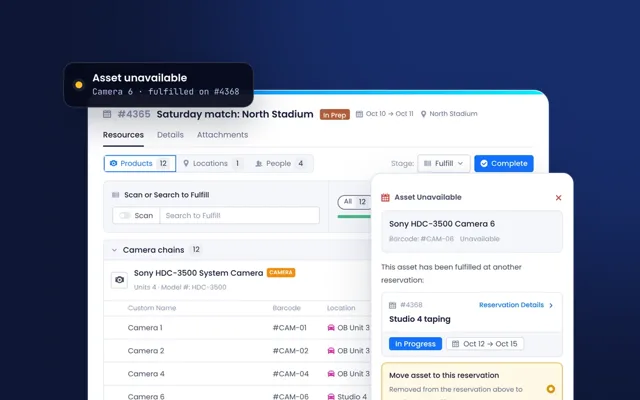
#4365Saturday match: North StadiumIn PrepOct 10 → Oct 11North Stadium
Premium Gaffer Tape (2" x 60yd)TAPE
Units 8 · Model #: PRO-GAFF-2IN
XLR Cable 10ftCABLE
Units 12 · Model #: GOLD-10 · Mogami
Fulfill All
Fulfill all bulk items
Fulfill all consumables
Set check status as
PENDING
Applies to bulk items and consumables. Serialized products are fulfilled unit by unit.
From the shelf to the job and back.
Bulk items and consumables move through the same reservation stages as your equipment, so stock is always counted against the work.
- 01Stock
Set minimum and maximum levels, and Beam marks each item in stock, low or out.
- 02Plan
Add quantities to a reservation, with stock shown as you search.
- 03Fulfill
Fulfill every bulk item and consumable on the job in one action.
- 04Back or used
Bulk items are checked back in. Consumables come off stock.
Connected to the rest of Beam.
Stock is counted against the same reservations, tickets and products as everything else, so what is on the shelf matches the work.
- Scheduling & ReservationsBulk items and consumables planned and fulfilled next to serialized equipment.
- Ticketing, Workflows & MaintenanceParts used on repairs and maintenance, and stock added from a ticket.
- Built-in Product DataBulk items and consumables matched to the manufacturer's product, like every asset.
- Asset IntelligenceAccessories and bundles linked to the equipment they go with.
One stock count, from the warehouse to the show.
- WarehouseWhat do we pull for tomorrow?The plan for each job, with bulk items and consumables fulfilled in one pass.
- ProductionDo we have enough for the tour?Stock shown as you plan, with upcoming bookings day by day.
- EngineeringWhat did that repair use?Parts and consumables recorded on the ticket.
- OperationsWhat needs reordering?Low stock alerts against the levels you set.
Counting from day one.
Our team brings your stock lists across with your equipment, and sets up the levels and alerts your teams work to.
Bring your stock
Bulk items and consumables from your spreadsheets, matched to the manufacturer's product as they land.
Set the levels
Minimum and maximum levels for each item, and who hears when stock runs low.
Book and use
Add quantities to reservations, fulfill them with the job, and record what repairs use.
Everything in Consumable & Parts Management.
The full capability list, grouped the way the product is. Open a group to see what is in it.
Bulk itemsBooked by quantity, back on the shelf.
- Bulk items booked by quantity
- Stock by owned, checked out, available and unavailable
- Check out and check in by quantity
- Upcoming reservations, day by day
- Utilization and reservation status
ConsumablesDrawn down as they are used.
- Withdraw from stock
- Add to stock, including from a ticket
- Usage tracking on reservations
- Usage tracking on tickets and maintenance
Stock levelsKnowing when to reorder.
- Minimum and maximum stock levels
- Automatic stock status: in stock, low, out of stock
- Restock quantities
- Low stock alerts
- Restock notifications
- Stock location tracking
On the jobPlanning and fulfillment.
- Stock shown while planning
- Quantities on the plan
- Fulfill all bulk items and consumables at once
- Substitutions when you run short
- Product bundles and accessories
- Check stock and update quantities on mobile
Across BeamBuilt in, like every module.
- Custom fields
- Filters and saved views
- Quick actions
- Data access attributes
See your stock counted in Beam.
Send us your stock list and we will plan your next job with it, bulk items, consumables and all.