

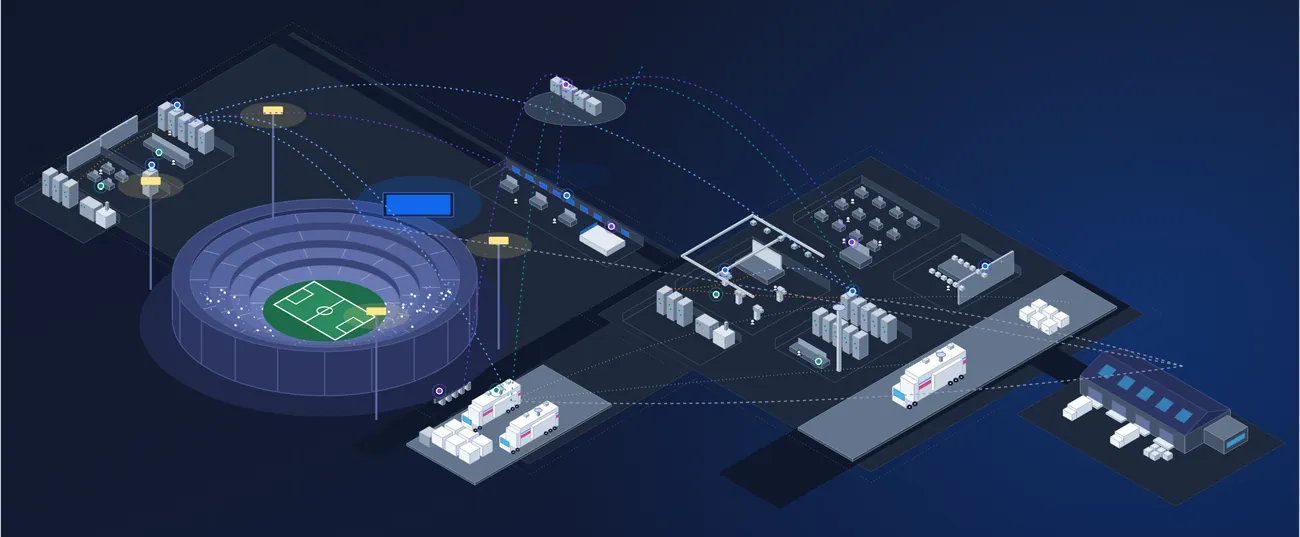














Every show booked. Every item back where it belongs.
Plan the equipment, crew, trucks and spaces each job needs, see what is free before you commit, and follow every item out to the show and back again, scanned at each step.
North Stadium
Saturday match
08:00AM - 09:00PM#4365
Midweek cup
06:00PM - 11:00PM#4371
OB Unit 3
Saturday match
07:00AM - 11:00PM#4365
Concert tour leg
10:00AM - 01:00AM#4380
Studio 4
Morning show
05:00AM - 10:00AM#4352
Studio 4 taping
09:00AM - 06:00PM#4368
Convention Center
New event
10:30PM - 02:00PM
One schedule for equipment, people and places.
A show needs cameras, lenses, intercom, a truck, a crew and somewhere to put it all. In Beam they are booked together on one reservation, on the same record as the equipment itself.
You see what is free before you commit, Beam flags anything already booked or still out on another job, and every item is scanned out to the show and back again.
Book anything
Assets, asset groups and bundles, people, vehicles and locations on one reservation.
See what is free
Availability by unit before you commit, across every other booking.
Catch conflicts
Double bookings and items still checked out, flagged before the truck leaves.
Out and back
Scan to fulfill, check out and check in, with every item accounted for.
See every booking, the way you plan
Lay out reservations on a timeline grouped by location, person, company or tag, or on an event calendar. Save the views each team works from, and filter resources down to the clients, vendors or crews you need.
- Timeline and event calendar views
- Group by location, people, company or tag
- Saved views for each team
- Filter resources by company category
MCMaya Chen
Saturday match
07:00AM - 11:00PM#4365
Concert tour leg
10:00AM#4380
JRJon Reyes
Saturday match
07:00AM - 11:00PM#4365
Cup
06:00PM#4371
PNPriya Nair
Morning show
05:00AM#4352
Studio 4 taping
09:00AM - 06:00PM#4368
SOSam Ortiz
Concert tour leg
10:00AM - 01:00AM#4380
Only show booked resources
Client8
Service Provider2
System Integrator1
Vendor3
Plan by product, then pick the units
Start with what the job needs: four cameras, four lenses, a camera chain bundle. Beam shows how many units are free for those dates and when the rest come back, so you can commit with confidence and choose the units later.
- Plan products, bundles and quantities
- Availability by unit for the dates
- Custom groups on each reservation
- Clone a reservation for the next show
#4365Saturday match: North StadiumOpenOct 10 → Oct 11North Stadium
Add Resources
Find resources to add
Sony HDC-3500 System CameraCAMERA5/7
Units 4 · Model #: HDC-3500 · Manufacturer: Sony
Canon CJ25ex7.6B lensLENS4/6
Units 4 · Model #: CJ25ex7.6B · Manufacturer: Canon
Camera chain bundleBUNDLE1/10
CCU, fiber cable, viewfinder · 4 tags
Intercom beltpackAUDIO14/20
Units 6 · Model #: FreeSpeak II · Manufacturer: Clear-Com
Availability5/7All Assets Page
WedThuFriSatSun
#CAM-01
#CAM-02
#CAM-03
#CAM-04
#CAM-05
#CAM-06
#CAM-07
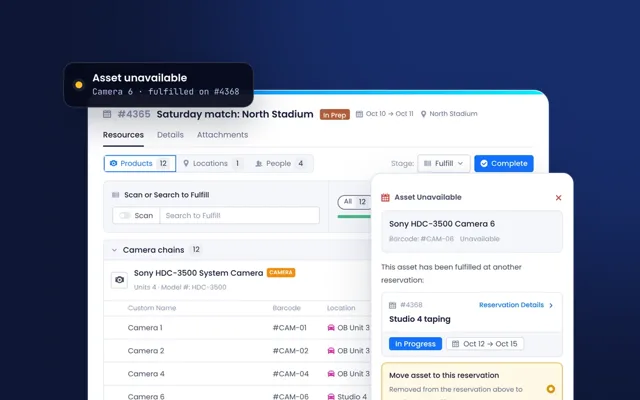
Conflicts caught before the truck leaves
Scan or search to fulfill the plan with specific units. If a unit is already on another job, Beam stops and shows you where, and lets you move it across or scan another one.
- Double booking alerts
- Items still checked out on another job
- Move a unit or scan another, in one step
- Progress by planned, fulfilled and remaining
#4365Saturday match: North StadiumIn PrepOct 10 → Oct 11North Stadium
Scan or Search to Fulfill
ScanSearch to Fulfill
Sony HDC-3500 System CameraCAMERA
Units 4 · Model #: HDC-3500
Asset Unavailable
This asset has been fulfilled at another reservation:
#4368Reservation Details
Studio 4 tapingOut and back, scanned at every step
Check equipment out against the reservation and back in when the show is over, by scanning on a phone with Beam Lens or at the desk. Past due items are flagged, and anything that comes back damaged can be reported on the spot.
- Check-out and check-in by scan
- Beam Lens mobile scanning
- Past due alerts
- Electronic signature on hand-off
#4365Saturday match: North StadiumCheck InOct 10 → Oct 11North Stadium
Scan or Search to Check-In
ScanSearch to Check-InCheck In
Barcode matched
Intercom beltpack 3Barcode #BP-03
Reservation#4365
LocationOB Unit 3
Check StatusChecked out
One reservation, from first plan to last item home.
Every reservation moves through the same four stages, so everyone can see where a job stands. Skip the ones you do not need, and set the check statuses your teams use.
- 01Plan
List the products, bundles, people and places the job needs, with quantities and dates.
- 02Fulfill
Scan or pick the exact units. Conflicts with other jobs are caught here.
- 03Check out
Scan each item as it leaves for the truck, venue or client.
- 04Check in
Scan it back. Anything missing or late stays visible until it returns.
Connected to the rest of Beam.
Reservations sit on the same record as the equipment, so availability, service and stock are always counted against the same items.
- Asset IntelligenceEvery asset carries its own schedule, with each booking it has been on.
- Ticketing, Workflows & MaintenanceReport an issue at check-in, and the ticket opens on the asset and the job.
- Consumable & Parts ManagementTape, batteries and cables booked by quantity and drawn from stock.
- Resource ManagementYour team and freelance crew, booked on the same reservation as the equipment.
- Integration IntelligenceBookings for each client, in their own workspace.
- Integrations, API & MCPBookings and availability for your own apps and your AI assistant.
One schedule, from the office to the loading dock.
- ProductionCan we do both shows next weekend?Availability for the whole job, with conflicts shown before anyone commits.
- WarehouseWhat is going out on the truck tomorrow?The fulfilled list by reservation, scanned out and back in.
- Crew leadsWho is on which job?People booked alongside equipment, on a timeline grouped by person.
- OperationsWhat is late coming back?Past due items and returning soon, across every location.
Running on your next show.
Our team brings your inventory, kits and upcoming bookings across with you, and sets up the views and check statuses your teams already use.
Bring your inventory
Equipment, bundles, vehicles, locations and people, matched to the manufacturer's product as they land.
Set up the views
Timelines and calendars for each team, and the stages and check statuses you work by.
Scan it out and back
Barcode labels and Beam Lens on the phones your crew already carry.
Everything in Scheduling & Reservations.
The full capability list, grouped the way the product is. Open a group to see what is in it.
ReservationsBooking what each job needs.
- Reservations for assets, kits, labor and locations
- Products, bundles and quantities
- Asset groups booked as one
- Substitute products when a unit is out
- Custom groups
- Clone reservations
- Stages: plan, fulfill, check out, check in
- Custom check statuses
- External communication
Views and schedulingSeeing every booking.
- Timeline view
- Event calendar view with day panel
- Group by location, people, company or tag
- Filter resources by company category
- Saved and shared views
- Time zone per view
Availability and conflictsKeeping bookings honest.
- Asset schedule on every asset
- Availability by unit
- Double booking alerts
- Checked out on another reservation
- Past due alerts
- Returning soon
Check-out and check-inOut to the show and back.
- Barcode scanning
- Beam Lens mobile scanning app
- Scan to fulfill
- Electronic signature
- Report issues at check-in
People and crewsBooking the team.
- People on reservations
- Availability for the job's dates
- Resource Schedule grouped by people
- Skill-based matching Coming soon
- Crew confirmation Coming soon
- Labor compliance rules Coming soon
Related products.
See your next show booked in Beam.
Bring an upcoming job and we will plan it with you, from the first list to the last item home.