















In-venue production equipment, ready for every game day.
For the teams behind in-game presentation and team broadcasts. Beam keeps every camera, replay server, LED processor and studio light on one record, with the checks, repairs and renewals that keep it on air.
Device · Serial # 4500213
Online
Checked Out
Control room
On the record
Product Lifecyclefrom the manufacturerSupported
Product Warrantylinked contractActive
Software Versionup to date3.20
License · 22 seats
Graphics, Control room
19 of 22
Mar 30, 2027
On the record
Contract statusannual termActive
Renewal statusApproved
Current Term Amount$31,680.00
Service · Bowl displays
Center-hung and ribbons
Online
Jun 29, 2027
On the record
Contract statusservice agreementActive
Renewal statusApproved
ProviderVCVendor C
Game day runs on equipment nobody can see all at once.
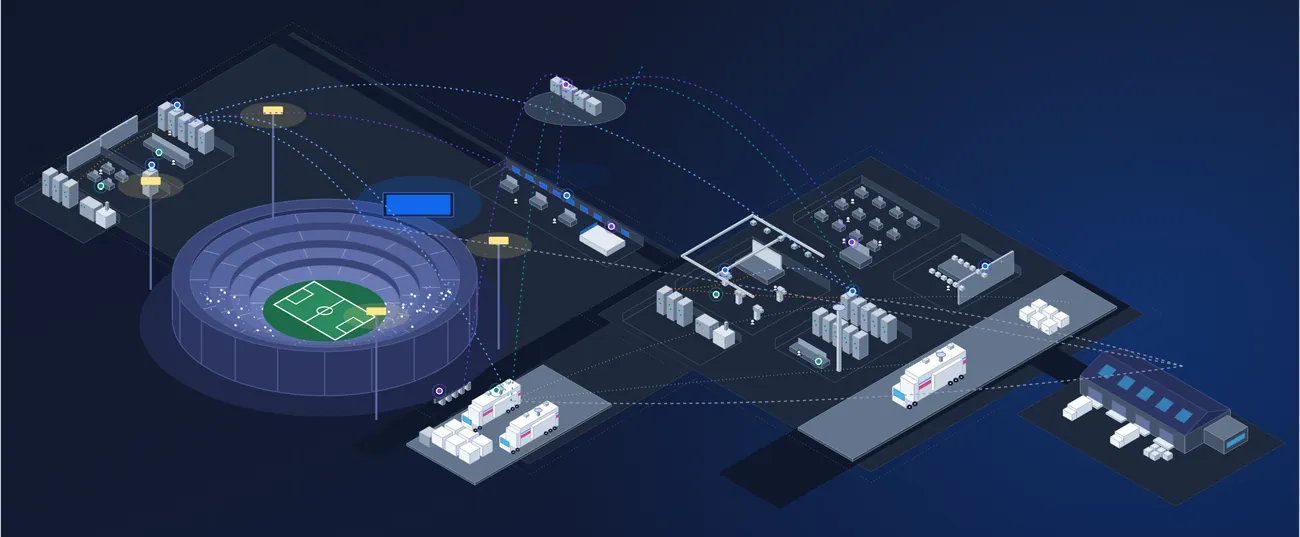
A control room, the bowl displays and a team studio add up to hundreds of devices from dozens of manufacturers. The inventory sits in a spreadsheet, the maintenance in someone's head and the warranties in a vendor's inbox.
Meanwhile the building hosts concerts and other events, the content team wants more shows, and the offseason is the one window to fix or replace anything. Beam puts all of it on one record your whole team works from.
Hundreds of devices, many makers
Cameras, replay, LED processors, intercom, audio and network gear across the bowl, the control room and the studio.
No second chance on game day
A failed device has to be found before the gates open, not during the game.
A small staff, a big crew
Full-time engineers work beside part-time, union and freelance crew who need the same facts.
One short offseason
Repairs, upgrades and replacements all compete for the same window between seasons.
Every device in the building, down to the rack
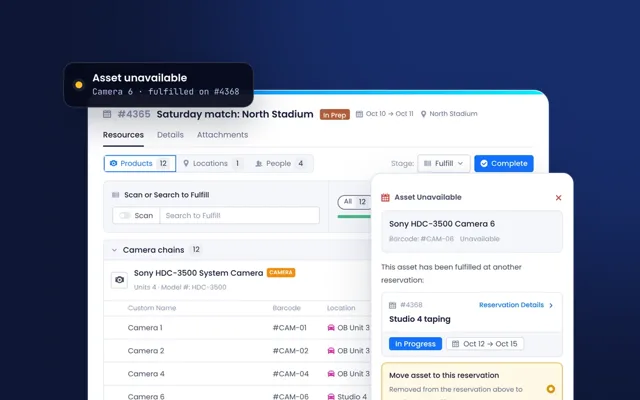
From the center-hung display to the replay servers and the studio cameras, see where each asset is, who has it and when it is next booked, and check it out or in with a barcode scan.
- Location hierarchy up to 7 levels
- Track placement from building to room to rack
- Track asset availability
- Check-in and check-out status
- Assign assets to users
- Barcode scanning support
Sony
StatusOnline
Reservation StatusChecked Out
LocationRack 12
AssigneeMCMaya C.
ArenaSite
Event levelArea
Control roomRoom
Rack 12Rack
Saturday home gameChecked Out
Oct 10 - 08:00 AM → Oct 11 - 09:00 PM
Coaches show tapingPlanning
Oct 15 - 09:00 AM → Oct 15 - 06:00 PM
October 2026
Maya ChenChecked out · mobile scan
MCMaya ChenStudio crewChange
Pre-game checks, done before the gates open
Schedule recurring checks on cameras, displays, intercom and the control room, with a checklist and an owner for each. When a check fails, raise a repair ticket from it in one step.
- Recurring tasks on assets and locations
- Checklists and completion tracking
- Calendar view and assignees
- Repair tickets created from a failed check
Task
Every
Next due
Assignee
Sensor clean and focus checkSony HDC-3500 · 14 assets
Every 6 months
Due in 14dMCMaya C.Annual service and calibrationVideo router
Yearly
ScheduledJRJon R.Videoboard pixel and color checkBowl · Center-hung display
Monthly
Due tomorrowPNPriya N.UPS battery checkControl room
Quarterly
CompleteJRJon R.Fiber connector inspectionCamera chains · 6 kits
Before each game
ScheduledMCMaya C.Clean sensor and filter wheel
Check back-focus on chart
Inspect fiber connector
Test tally and intercom
Record result on the asset
Any crew member can report a problem
Requests come in by email, a public form or straight from an asset. Each one becomes a ticket linked to the equipment it is about, so the engineer on call sees the device, its history and its warranty.
- Email, public form and client portal
- Create tickets from an asset or a list
- Shared inbox for each ticket type
- Primary and secondary assets on every ticket
Ticket #
Ticket Name
Assignee
Status
Assets
Due Date
Priority
#4121
Router PSU fan alarm
#4120
Intercom beltpack dropping
#4055
Viewfinder fault, Camera 4
#4118
Replay server not booting
#4102
Lens back-focus drifting
#4117
Tally light intermittent
Email5
Public form3
Client portal2
From an asset1
Manufacturer advisory1
Ticket#4121 · Support
AssetCore video router
Plan the offseason from facts
See which devices are out of warranty, on old firmware or near end of life well before the season ends, so refresh projects and capital requests start from your own data.
- Lifecycle tracking
- Warranty status and warranty alerts
- End-of-life alerts
- Firmware and software updates
- Condition and performance monitoring
- Decommission workflow
Software 3.20Sep 2, 2026
InstalledSoftware 3.10Mar 14, 2026
PreviousTeam studio · Device
Product LifecycleEnd of Life
Product WarrantyExpired
End of Life dateJun 30, 2026
A record every shift can trust
Every update, scan and status change is logged with the user and time behind it. Part-time and freelance crew work in the same record on the iOS and Android apps.
- Detailed activity history of related events
- Timestamped logs with user attribution
- Tamper-proof records
- Status change notifications
- Native iOS and Android apps
- Barcode and QR scanning in the field
Oct 1, 2026
Maya ChenChanged Assignee
Maya ChenChanged Asset status
Jon ReyesChanged Software Version
Barcode matched
HDC-3500 cameraSerial # 4500213
StatusOnline
LocationRack 12
ReservationFulfilled
Built for the team behind the show.
Broadcast engineering, game presentation and production technology leads, and the engineers and crews who run the control room, the bowl and the studio.
- Control roomSwitchers, replay and routing
Every rack and device, its firmware and its support contract.
- The bowlVideoboards and ribbons
Displays, processors and the checks that run before each game.
- Team studioShows and content
Cameras, lights and audio for coaches shows, pregame and social.
- Beyond the arenaPractice facility and road
Equipment that moves between buildings, checked out and back in by scan.
What is in-venue production equipment management?
It is one record of the equipment a team uses to run in-game presentation and its own broadcasts: control room systems, videoboards and LED, cameras, replay, audio, intercom and studio gear. Beam tracks where each device is, what covers it, when it was last checked and every repair, so the team knows what is ready for game day.
Can Beam track equipment across the arena, the control room and our team studio?
Yes. Beam records each asset in a location hierarchy of up to seven levels, from building to room to rack, so the control room, the bowl, a team studio and a practice facility each have their place. Equipment that moves between them is checked out and back in by barcode scan.
How does Beam help us get ready for game day?
Schedule recurring checks on displays, cameras, intercom and control room systems, each with a checklist and an owner. Completed checks are recorded with the user and time. When a check fails, a repair ticket opens on the asset, so problems are found and fixed before the gates open.
Can part-time and freelance game day crew use Beam?
Yes. Pricing includes unlimited users, so part-time, union and freelance crew can work in Beam alongside full-time staff. They report problems from the iOS and Android apps or a public form, scan equipment in and out, and see only what their role allows.
How does Beam help plan offseason upgrades?
Beam tracks warranty status, firmware and software versions, lifecycle and end-of-life dates for every asset, with manufacturer data built in. Dashboards show what is aging, expired or near end of life, so refresh projects and capital requests are planned from your own data well before the offseason.
Does Beam monitor device health in real time?
Beam does not monitor devices itself. Device status and health data come into Beam through integration partners, and appear on the asset record alongside its tickets, contracts and history. See Integrations, API & MCP for how Beam connects to the systems you already run.
How long does it take to get started?
Send the lists you have: spreadsheets, exports, serials, locations and rack positions. Beam cleans and loads them, matches each line to manufacturer data, and your first site is live within weeks. Our team imports your data with you, and the Onboarding Process page shows each step.
See your own control room in Beam.
Send us an equipment list and we will load a sample of it into a live demo.