

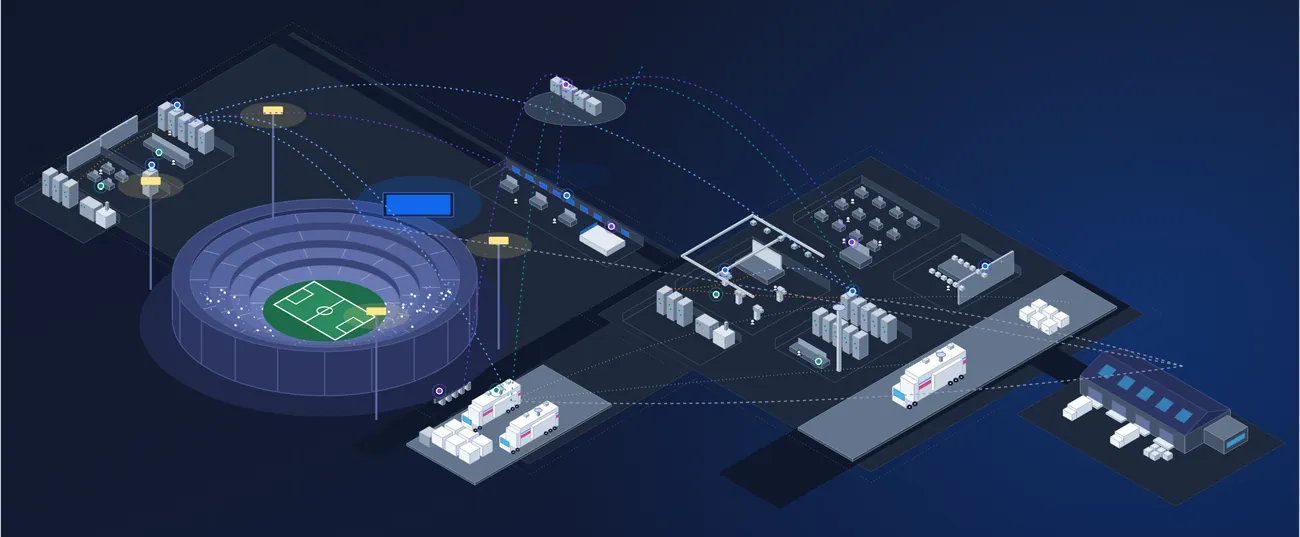















One master account for every client you deploy and support.
Integration Intelligence is built for system integrators and resellers who manage what they sell and deploy. Track each client's assets and licenses in a workspace you keep internal, or open directly to the client.
Client workspaces
4
Assets across all
7,640
Renewals due
12next 90 days
Client
Assets
Renewals due
Access
4,210
6
1,860
2
930
1
640
3
The integrator layer on top of Beam.
A master account gives you portfolio visibility across every deployment. Client assets and licenses are tracked in workspaces you keep internal or open directly to clients, with modules activated per workspace.
An organized, searchable client portal lets customers see their assets, submit their own support tickets and find manuals and documentation, while you keep cross-deployment reporting, sold-asset visibility and renewal management behind the scenes.
Master account
One login above every client deployment, with admin for your whole team.
Client workspaces
A workspace per client, internal only or open to them, each with its own modules.
Client portal
Customers see their assets, raise tickets and find documentation.
Renewals and revenue
SLA, warranty and license alerts across every client you support.
Portfolio visibility across every deployment
See every client you have deployed from one master account: what you sold, where it is installed and what state it is in. Report across all of them, or open any one.
- SI master account and integration admin
- Portfolio visibility across deployments
- Cross-deployment reporting
- Sold asset visibility
Company
Category
Asset Link
Contacts
Ticket Link
Last Activity
Regional broadcaster
Oct 1, 2026
Stadium venue
Sep 28, 2026
University campus
Sep 13, 2026
Corporate headquarters
Aug 25, 2026
Vendor A
Aug 19, 2026
Fiber services
Aug 19, 2026
Sam O.Engineer in Charge
555-0142
s.ortiz@regional.example
Lee P.Engineer
555-0178
l.park@regional.example
#50621
Scoreboard feed dropping
JRJon R.Urgent!Working#50618
Replace wireless receiver
AssignUncertainSubmittedWorkspaces you keep internal, or open to the client
Each client gets a workspace holding their assets and licenses. Keep it for your own team, or give the client access with their own users, and turn on only the modules that client needs.
- Client asset and license tracking
- Internal or client-facing workspaces
- Per-workspace module activation
- Client workspaces with their own users and SSO
AccessClient-facing
Client sign-intheir own SSO
Asset Intelligence1,860 assets
Contract Intelligence24 agreements
Ticketingclient tickets land in your queue
Scheduling & Reservationsnot included
SOSam OrtizAdminClient
LPLee ParkView onlyClient
JRJon ReyesSupportYour team
A client portal for assets, tickets and documents
Give customers an organized, searchable view of what you installed for them. They see their assets, submit their own support tickets and find manuals and documentation, from read-only through to full self-service.
- Client self-service ticket submission
- Client-facing document manager
- Manuals and documentation per asset
- Read-only through full self-service
Assets
1,860
Open tickets
4
Documents
212
Ticket #
Ticket Name
Status
#50621
Scoreboard feed dropping
#50618
Replace wireless receiver
#50611
Add two control seats
Control room as-built.pdf
Your teamLED processor manual.pdf
From the manufacturerHandover and warranty pack.pdf
Your teamRenewals and revenue across every client
Track SLAs, warranties and licenses for every client in one list. Alerts tell you what is expiring and where, and surface the upsell opportunities that come with it.
- Revenue and renewal management
- SLA, warranty and license alerts
- Upsell opportunity surfacing
- A cross-customer view of every renewal
Name
Client
Current Term End Date
Router support
Oct 27th, 2026
Network support SLA
Nov 17th, 2026
Display warranty, 40 units
Dec 8th, 2026
Control licenses
Dec 29th, 2026
October
$61.0K
4 contracts
November
$84.2K
5 contracts
December
$39.0K
3 contracts
29 assets at end of life
Regional broadcasterRefresh21 assets out of warranty
Stadium venueQuoteControl licenses end Dec 29
University campusRenewLifecycle, updates and changes, reported for every client
Every client estate runs on the same asset records, so you can report on where each one is in its life: what is out of warranty or reaching end of life, which firmware and software updates are outstanding, and what has changed in configuration since your last visit. Take it into a service review, or use it to plan the next refresh.
- Asset lifecycle and license renewal tracking
- Firmware and software update tracking
- Full activity history and change log
- Custom reporting, export to PDF or CSV
Clients
4
Assets sold
7,640
Out of warranty
86assets
End of life
41assets
Client
Assets
Out of warranty
End of life
4,210
52
29
1,860
21
12
930
13
None
640
None
None
HDC-3500 cameraSoftware 3.20
14 devices at 3 clients
Video routerFirmware 2.8
6 devices at 2 clients
LED processorFirmware 5.1
4 devices at 1 client
Stadium venueVideo router
Regional broadcasterAudio console
Open change log
Three ways to run it.
Use it inside your own business, share it with clients, or sell it on.
- For your team
Internal use
One view of every client's estate for your own team. Technicians arrive with the full record.
- For your clients
Client portal
Branded workspaces with the client's own users and SSO, from read-only through full self-service. Client tickets land in your queue.
- For your business
Channel resale
Resell Beam to your clients, or attach it to your managed-service contracts.
Every workspace starts with verified product data.
Load what you installed and each line is matched to a verified manufacturer product, with specifications, manuals, warranty terms and lifecycle status filled in for you and your client.
Turn on what each client needs.
Every workspace is a full Beam deployment. Products are activated per workspace, so each one holds only what that client uses.
- Asset IntelligenceEverything you sold and installed, on one record per asset.
- Contract IntelligenceThe client's SLAs, warranties and licenses, with renewal alerts.
- Ticketing, Workflows & MaintenanceClient tickets and scheduled maintenance, tied to the asset.
- Scheduling & ReservationsBookings for shared equipment, rooms and people.
- Built-in Product DataIncluded in every workspace.
One product, used on both sides of the handover.
- LeadershipHow is the whole installed base doing?Portfolio visibility and cross-deployment reporting from the master account.
- ServiceWhat did we install, and what state is it in?Technicians arrive with the full record. Client tickets land in your queue.
- Account managementWhat is expiring, and what is it worth?A cross-customer view of every renewal, with SLA, warranty and license alerts.
- Your clientsWhere do I see my equipment and get help?They see their assets, submit their own tickets and find manuals and documentation.
From handover to a live client workspace.
Start with one client. Add the rest as you go.
Set up your master account
Your team, your roles and your own equipment, if you run any.
Create a workspace per client
Load what you sold and installed. Each line is matched to manufacturer data.
Choose products and access
Turn on what the client needs, and keep the workspace internal or open it to them.
Invite the client
Their users sign in to see assets, raise tickets and find documents.
Everything in Integration Intelligence.
The full capability list, grouped the way the product is. Open a group to see what is in it.
Integrator account and workspacesThe master account, client workspaces and portal.
- SI master account and integration admin
- Portfolio visibility across deployments
- Client asset and license tracking
- Internal or client-facing workspaces
- Per-workspace module activation
- Cross-deployment reporting
- Sold asset visibility
- Client self-service ticket submission
- Client-facing document manager
- Revenue and renewal management (SLA, warranty, license alerts)
- Upsell opportunity surfacing
- Post-deployment white-glove support
Users, roles and permissionsWho can see and do what, in each workspace.
- Controlled access based on attributes (ABAC)
- Role-based access control (RBAC)
- User roles
- User groups
- Single sign-on (SSO)
- Multi-factor authentication (MFA)
- Unlimited view-only users
- User directory
- Permission management
- Access revocation
Data import and migrationGetting each client's equipment in.
- Spreadsheet import via .csv or .xls
- Invoice and PO scanning with OCR
- Quick-add assets from preloaded catalog
- Auto-matched and enhanced with manufacturer data
- Preloaded manuals and specs
- Import full historical data (assets, tickets, reservations, purchases and more)
- Create relationships between imported records
- Track historical imports
- Track data review process
- API-based data import
The Intelligence products.
Every asset you own, maintain, support or rent, managed on one record.
ExploreIntelligenceContract IntelligenceLicenses, contracts and renewals, alongside the equipment they cover.
ExploreYou are hereIntegration IntelligenceOne master account for every client you deploy and support.
This pageSee one of your client estates in Beam.
Send us one client's equipment list and we will set it up as a sample workspace in a live demo.